

New Preview Alpha and Alpha Skip Ahead 1810 Update – 8/15/18
Starting at 2:00 p.m. PDT today, members of the Xbox One Preview Alpha – Skip Ahead and Preview Alpha rings will begin receiving the latest Xbox One system update (1810.180812-1920). Learn more about the new features in development for 1810 here, and read on for a list of fixes and known issues in this 1810 system update.
Important Build Notes
Avatar Editor
We are releasing an update to Insiders in the Alpha Skip Ahead, Alpha, and Beta rings! This build includes updates to Avatar rendering as well as other improvements to the Avatar Editor user experience. Please check out the new navigation animations as well as the newly released collection of moods and props!
Avatar Store
The first build of the new Avatar Store is arriving today for Alpha Skip Ahead and Alpha rings on Xbox One! Starting later today, you’ll find an Avatar Store button on the main menu of the Avatar Editor. You’ll be able to browse and search the content catalog and preview items on your own Avatar within the store. We have a small collection of content in the store right now, and as our partners create more content, you’ll see it appear in the store in real time. We have more planned for the Avatar Store, but we’re eager to start receiving your early feedback.
Please be aware that any content you purchase during preview will be available to you throughout the Insider preview and after the feature ships to the public. Purchases made in the new Avatar Store will be included on your Microsoft account’s purchase history. To celebrate the launch of the new store, we’ve included a free Xbox Avatar shirt celebrating the Insider program! Get it quickly because once the Avatar Store ships to the general public, this shirt will no longer be available.
Avatar Editor on Windows 10
We’ve mentioned before that the Avatar Editor is a Universal Windows Platform application and now we’re ready to start collecting feedback from Windows 10 users! If you’re in the Alpha Skip Ahead, Alpha, or Beta rings on Xbox One, you’ll find a new quest in the Windows 10 version of the Xbox Insider Hub that will tell you how to download and provide feedback for the Avatar Editor on your Windows 10 device. Please note that the Avatar Store will not appear on any version of the Avatar Editor on Windows 10 at this time.
New Shopping Cart
Please check out the post we made yesterday about enabling the Shopping cart for certain Insiders https://news.xbox.com/en-us/2018/08/14/shopping-cart-in-xbox-store/. Try out the cart and provide us with your feedback!
Broadcast Everything
With the latest update, Xbox users will be able to broadcast not just gameplay but the entire Xbox One console experience to Mixer. Users can turn on this setting in the broadcasting tab in Guide.
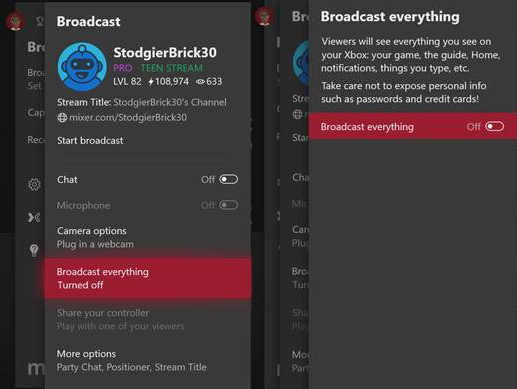
This setting is always disabled at the end of the broadcast and the user must explicitly enable it. This feature will prevent unnecessary pause screens on Mixer as the user transitions from one game to another.
The broadcast during this time will behave very much like a capture card with a few exceptions.
- Non-game audio is not included in the broadcast.
- HEVC applications like Netflix and YouTube will terminate the broadcast.
When this setting is enabled everything you see, your audience will see: your Home screen, the guide, your game, notifications, what you’re typing, and more.
Be careful not to broadcast personal information such as passwords and credit card numbers!
Double check your privacy settings
- To keep your email from showing on Home, go to Settings and choose Account > Sign-in, security & passkey, and uncheck Show on Home.
- To hide notifications, go to Preferences > Notifications and uncheck Notification banners on.
Fixes:
Audio
- Fixed issue where some audio events caused the console to crash.
My Games and Apps
- Fixed an issue with the YouTube app failing to launch. It should no longer crash immediately upon launch.
- Fixed issues in which some users could not launch or reinstall Netflix.
- Filtering Groups within collections will no longer display a blank drop down menu.
Known Issues:
Audio
- We are aware that some users are experiencing issues where mics do not work. Please file feedback if you experience this.
Avatars
- It can take up to 10 seconds to view an Avatar on the profile screen after creating a new Avatar.
Console performance
- We are aware that some users encounter performance issues when coming out of Instant on. Please take the console update and then after it has landed on home, wait and be patient as some fixes are implemented. You should then see subsequent boots being a lot faster. Please file feedback if you continue to see issues.
Microsoft Edge
- Microsoft Edge crashes for some users at random times.
- The cursor may disappear when exiting and re-entering the app.
- Workaround: Press Y when re-entering the app to make the cursor re-appear
OneGuide
- Sometimes users may encounter stuttering when launching straight into Oneguide after the console is turned on from Instant on. Please file feedback when you see this.
- Here is a workaround to resolve temporarily:
- Navigate Home via the Guide
- Quit OneGuide manually from the Home screen
- Wait 15-30 secs
- Launch any other streaming app (Netflix, HBOGO, YouTube)
- One launched, play a video
- Once video begins playing (it should play normally) exit the app and relaunch OneGuide
Profile Color
- Sometimes users may encounter the incorrect Profile color when powering on the console.
Virtual Keyboard
- We are aware that some characters appear incorrectly when using the Virtual Keyboard in conjunction with a chatpad. Workaround : Disconnect the chatpad.