Earlier this month, we made some big announcements at E3 about bringing two highly-anticipated features to Xbox One preview program members—Xbox One Backward Compatibility and game streaming from your Xbox One to a Windows 10 PC. Today, we’re sharing even more new Xbox on Windows 10 features launching in preview this month.
Xbox on Windows 10
First up, new features for the Xbox on Windows 10 app:
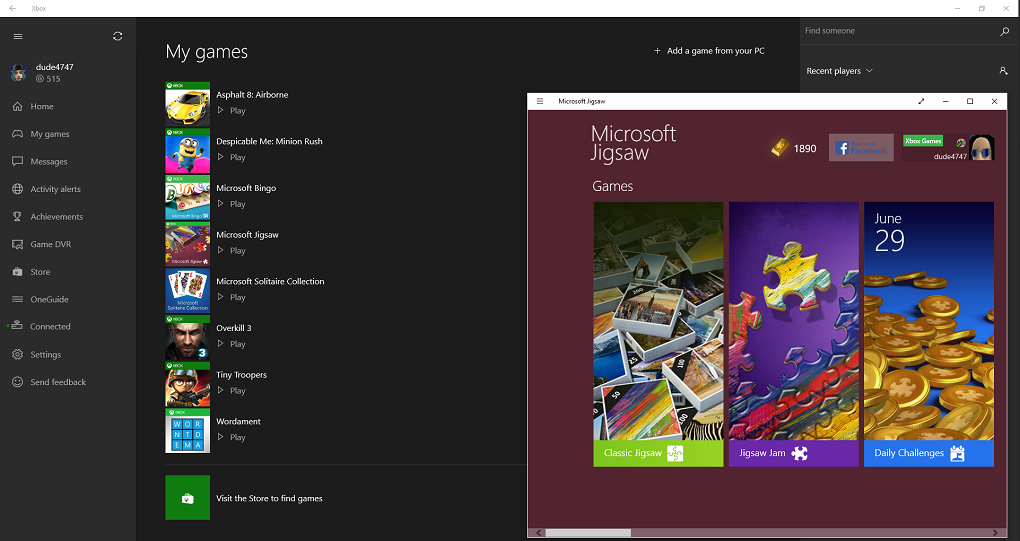
- My Games – A key ingredient of the Xbox on Windows 10 app is making its initial appearance this month, enabling you to add and launch Windows games from the new My Games menu. As you install games from the Windows Store, they will appear in your My Games list. Additionally, you can manually add games to your collection by selecting My games > Add a game from your PC. Also, there is now a Featured games section on the home screen, below your Recently played list, which lets you discover and install new and popular games available from the Windows store.
- Game hubs – You can now launch a local PC game from its game hub, view details about the game in the Windows Store, and find and follow People to Watch for a given game. Go to My games, then right click and select Go to game hub to access the game hub for a specific PC game. Additionally, for Xbox One games, you can now choose Play from console to initiate a game streaming session from a game hub page.
- Share with your friends – With this preview release, you can share your achievements to your Activity feed and Showcase just like you do on Xbox One. You can also share your Xbox One Game clips or Screenshots listed under Game DVR > Shared to your Activity Feed and Showcase.
- Xbox avatars – We renamed the Avatars app on Windows 10 to Xbox Avatars and the layout and iconography have been updated to final designs. In this month’s preview, there is a “Take a photo” feature so you can pose your avatar and snap a photo. Additionally, you can even capture photos of your avatar interacting with your avatar props. Let the photo shoots begin!
- Xbox account – In preview, you can sign in to Xbox on Windows 10 with any account, and create a new Xbox account if you do not already have one.
You will need Build 10158 of Windows 10 installed on your PC, then the Xbox on Windows 10 app should automatically update to the new preview version when it becomes available in the Windows Store. Once you receive the update, your version number should be 6.6.27004.00000 or higher. You can verify the version number of the Xbox on Windows 10 app under Settings.
Xbox One Preview
Please continue sending your feedback on the two amazing new features we launched in Xbox One preview earlier this month – Xbox One Backward Compatibility and game streaming. In addition, the team is continuing to test the Miracast functionality in the Wireless Display app and appreciates your patience while we iron out the kinks.
Stay tuned for more great Xbox features coming your way on Xbox One and Xbox on Windows 10. And don’t forget to let us know what you think at Xbox Feedback.